
There are a few posts around on the internet explaining how to connect to SQL Server from Java. The most popular is probably using the JDBC driver (http://msdn.microsoft.com/en-us/sqlserver/aa937724), but somewhere I read that for bulk insertions the jTDS driver (http://jtds.sourceforge.net/) is faster. I’m trying to insert some SNOMED related data into SQL Server (started with 2008 Express, but using 2012 Express RC0 now) which requires ~300k insertions.
I wanted to connect to the SQL database using a username and a password. I ended up getting a bunch of connection related errors. Here’s the Java code snippet I was using with connection string details:
String url = "jdbc:jtds:sqlserver://MYPC/MyDB;instance=SQLEXPRESS";

try {
    Class.forName("net.sourceforge.jtds.jdbc.Driver");
    conn = DriverManager.getConnection (url, userName,password);
    System.out.println ("Connection successful");
} catch (Exception e) {
    System.err.println ("Cannot connect to database server");
    e.printStackTrace();
}
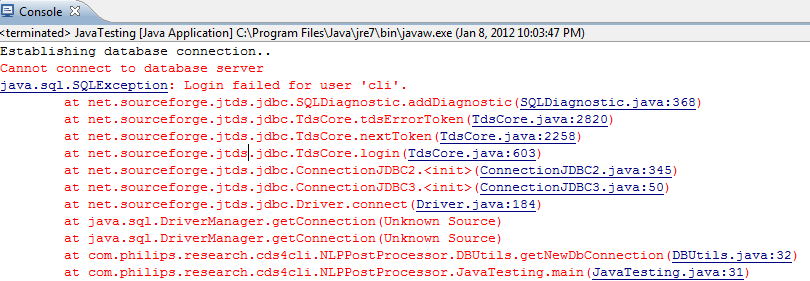
Here are a couple of errors I was getting:
![clip_image001[19]](https://thusithamabotuwana.com/wp-content/uploads/2012/01/clip_image00119.jpg "clip_image001[19]")
Resolution:
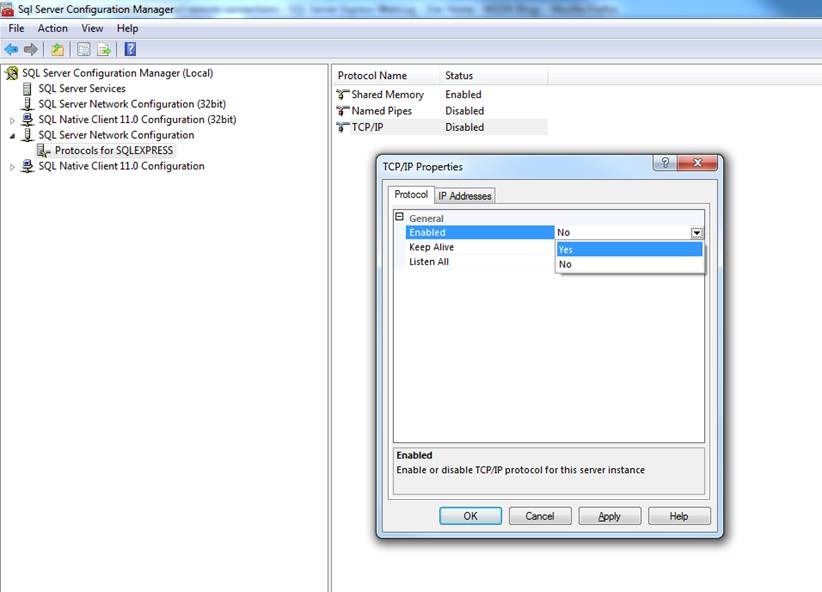
Enable TCP/IP to resolve the first error and restart the SQL Service:
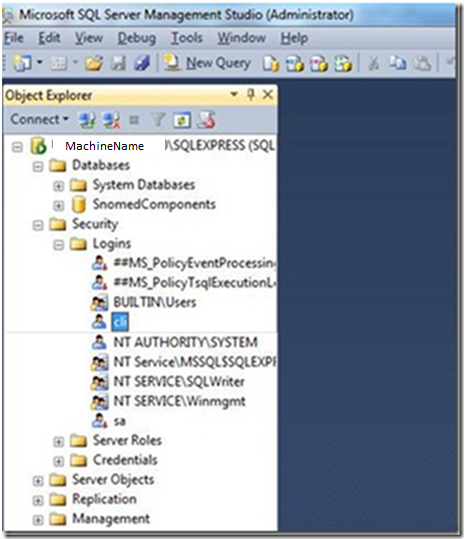
To resolve the second issue, create a new user – cli in my case, and set the ‘Server Roles’ as shown below. You may have to uncheck ‘Enforce password policy’ when creating the new user (depending on the password).
![clip_image001[17]](https://thusithamabotuwana.com/wp-content/uploads/2012/01/clip_image00117.jpg "clip_image001[17]")
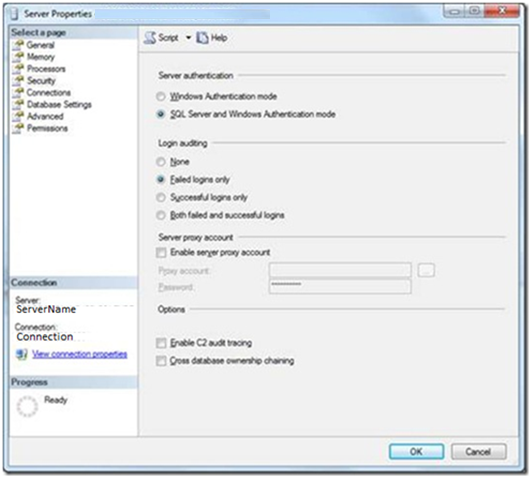
Make sure you set the authentication to ‘SQL Server and Windows Authentication mode’.
That’s it!
 Thusitha Mabotuwana's Blog
I spent 8 hours trying to get a particular TOMCAT war to connect. Your post gave me the proper syntax of the jdbcUrl 🙂
Tomcat itself put in the escape backslashes and will obscure the password.
I don’t recommend using sa but this was a burn down build.
<<>>
jdbcUrl=jdbc\:jtds\:sqlserver\://MYSERVER/mydb;instance\=SQLEXPRESS
datasource=percDataSource
hibernate.dialect=com.percussion.delivery.rdbms.PSUnicodeSQLServerDialect
db.username=sa.quick.n.dirty.for.permissions
db.password=put.your.password.here
hibernate.query.substitutions=
db.schema=DBO
hibernateProperties=percHibernateProperties
jdbcDriver=net.sourceforge.jtds.jdbc.Driver
Same here, got the correct syntax for the jdbc