
I had to figure out a bunch of things for a recent Azure Databricks hobby project I was working on. Required a whole bunch of Google searches, and quite some time, so thought I would capture some of the useful things I learned during the process:
This was the overall architecture:
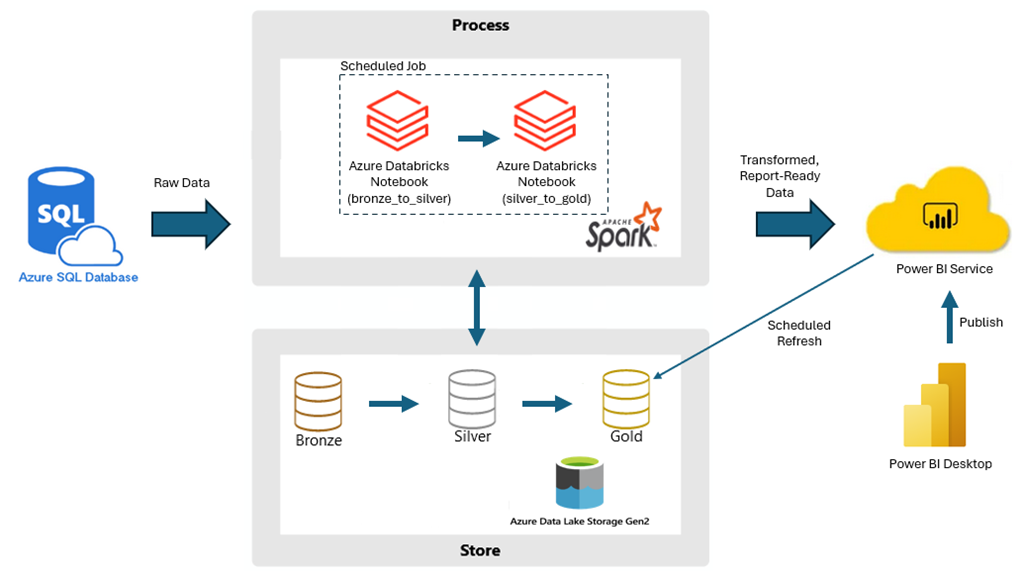
- Creating a ‘standard’ CSV file:
When working with CSV files, the writer creates multiple files even when working with relatively small-sized files. Sometimes you just want a straightforward csv file that you can easily open. This is a routine that does that:
def WriteCsvToLocation(dataframe, location, filename):

    dataframe.coalesce(1).write.option("header","true").option("escape", "\"").mode("overwrite").format("csv").save(location + "tmp")

    # write multi-part file to temp location, then move .csv to desired location.
    fileNames = dbutils.fs.ls(location + "tmp")
    name = ''
    for fileName in fileNames:
        if fileName.name.endswith('.csv'):
            name = fileName.name

    dbutils.fs.cp(location + "tmp/" + name, location + filename + ".csv")
    dbutils.fs.rm(location + "tmp", recurse = True)
- Common functions:
You can include all common functions and file location details in a file that you can then include in other files. For instance, I have a file called ‘CommonFunctions’ which has all the location details, and other shared functions.

It’s in the same workspace as other files:

You can then call the common file at the top of a workbook using:

From then on, it’s like calling a standard function, e.g.:

- Creating an empty dataframe row and populating only some values:
I wanted get some data using SQL, and append new rows to an existing dataframe (that has like 25 columns). This is what I used to get inactive projects from a database, and then append them to a dataframe with “Inactive” status:
# df is the dataframe you want to append the new rows to

df # initialized however

dfFromSQL = spark.sql("SELECT * FROM yourTable")

for row in dfFromSQL.collect():
    newRowVals = [f.array(lit(None) * len(df.columns))]
    dfNewRow = spark.createDataFrame(newRowVals, df.schema)

    dfNewRow = dfNewRow.withColumn("Institution_Id", lit(row['Institution_Id']))
    dfNewRow = dfNewRow.withColumn("Institution", lit(row['Institution']))
    dfNewRow = dfNewRow.withColumn("IsActiveProject", lit("Inactive"))

    df = df.union(dfNewRow)
- Creating a temp SQL table from a dataframe
Sometimes it’s just easier to work with SQL when you need to do joins and filtering together with GROUP BYs and HAVING clauses. You can easily convert a dataframe to a SQL temp table using createOrReplaceTempView. E.g.:
dfInstitution.createOrReplaceTempView('tbl_dfInstitution')
From here on, you can use spark.sql to execute SQL commands. E.g.:
spark.sql("select count(distinct Institution_Name) from tbl_dfInstitution").show()
queries the tbl_dfInstitution table that was created in the previous step. You can create multiple tables using createOrReplaceTempView and then write standard SQL against these. To save back to a dataframe, simply use:
dfFromSQL = spark.sql(“SELECT * FROM yourTable”)
 Thusitha Mabotuwana's Blog
Leave a comment